Deleting an Online Account Safely: Sign Out vs Unlink vs Delete
A researched guide to the four actions people often confuse: signing out, revoking Google access, deleting a third-party app account, and deleting a Google Account.

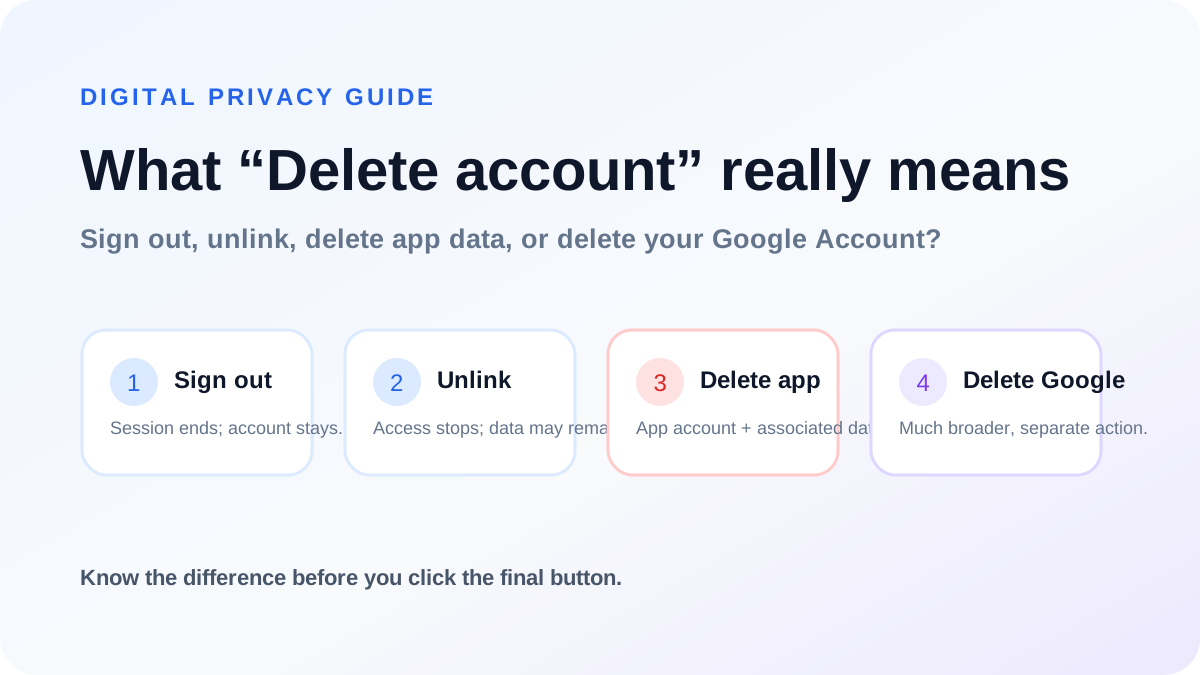
“Delete account” is not one universal action
People often use the words sign out, disconnect, unlink, revoke access and delete account as though they mean the same thing. They do not. A person can sign out of an app while the account remains intact. They can remove Google access while the app still keeps an account. They can delete the app’s account without touching the Google Account. And they can delete the Google Account itself, which is a much broader action.
Understanding the difference matters because each action changes a different relationship between your device, the application, the identity provider and stored data.
1. Signing out ends a session; it usually does not delete anything
Signing out tells the app to stop treating the current browser or device as authenticated. The account normally remains on the service, together with its server-side profile and data. You can usually sign in again later and continue where you stopped.
Use sign-out when you are on a shared device, when you want a break, or when your goal is simply to end the current session. Do not expect sign-out to satisfy a request to erase account data.
2. Unlinking or revoking Google access is different from deleting the app account
Google lets users review and remove links to apps from other developers. Revoking a link can prevent the third-party service from continuing to access Google data covered by that authorization. But Google warns that the app may keep information it already received.
That is why revoking access and deleting the third-party account are separate controls. If your goal is to delete information held by the app developer, you generally need the app developer’s own deletion process as well.
3. Deleting a third-party app account does not delete your Google Account
Google’s help documentation states that deleting your account on an app from another developer does not affect your Google Account because the accounts are independent. Even if you originally used Sign in with Google, the third-party account is still an account controlled by that service.
This distinction protects users from a dangerous misunderstanding: deleting a study app, game, marketplace or productivity account should not erase Gmail, Drive, Photos or the rest of the Google Account.
4. Deleting your Google Account is the broadest action
Deleting a Google Account is a separate Google-controlled process with consequences across Google services. It can affect Gmail, files, photos, subscriptions and other data tied to that Google identity. It is not something a third-party app should silently perform for you.
If your goal is only to leave one third-party service, use that service’s deletion controls instead of deleting the entire Google Account.
5. Why secure deletion flows ask you to authenticate again
Authentication sessions can live longer than the moment when the real account owner is sitting at the device. Firebase therefore classifies actions such as deleting an account, changing a primary email or changing a password as security-sensitive and requires recent authentication.
A good deletion flow asks the user to prove identity again using the sign-in method appropriate for that account. That extra step is not pointless friction; it reduces the risk of destructive actions from stale or stolen sessions.
6. A third-party app should never ask for your Google password directly
Google says Sign in with Google does not share your Google Account password with the third-party app. The user authenticates with Google, and Google provides the app with approved account information or credentials needed for the sign-in flow.
If a third-party site claims to use Sign in with Google but asks you to type the Google password directly into the third-party site’s own password box, treat that as a warning sign. Check the domain and use the official Google authentication experience.
7. What “delete my data” can mean in a real system
A service can store several categories of information: the primary account identity, profile data, content or progress, payment references, security logs, fraud-prevention signals, backups and aggregated analytics. A responsible privacy policy should explain which categories are removed, which are anonymised, and whether narrowly scoped records follow a limited retention period.
Users should therefore avoid assuming that every byte disappears from every system at one identical moment. The important questions are whether the active account is removed, whether product data remains usable, why any retained record is necessary, and how long that retention lasts.
8. Account deletion can have disadvantages even when it is the right privacy choice
Deletion can remove history you later wish you had kept: learning progress, saved items, profile reputation, receipts, preferences or account-linked entitlements. Some services also use the account identity to prove ownership of previous purchases or support cases.
The answer is not to make deletion difficult. The answer is to explain the consequences before the final step and give users enough information to make an informed choice.
9. What a good deletion page should show
A strong deletion page identifies the account being deleted, explains the main consequences, provides an appropriate re-authentication method, makes the destructive action visually clear, and asks for an intentional confirmation. It should not hide the delete control behind unrelated marketing or require a user to reinstall an app just to submit the request.
Google Play’s current account-deletion requirements specifically emphasize that users should have a functional web resource for deletion requests when the policy applies, including users who may have already uninstalled the app.
10. A useful four-question decision tree
Ask yourself: Do I only want to end this session? Sign out. Do I only want to stop Google from sharing or providing access to the app? Review the Google linked-app connection. Do I want the service’s account and associated data removed? Use that service’s account-deletion process. Do I want to remove the entire Google identity and its Google-service data? Use Google’s own Google Account deletion controls.
Choosing the smallest action that matches your real goal prevents accidental data loss.
11. Checklist before deleting any online account
Confirm the exact account email or username. Review paid plans, purchases, receipts and files you may still need. Check whether you use Google, Apple, email/password or another provider so you know how re-authentication will work. Read the service’s privacy/deletion explanation. Verify the site domain before entering credentials. Finally, make sure you are choosing account deletion rather than merely revoking a linked-app permission—or vice versa.
12. Clarvo as a practical example
Clarvo separates these concepts in its current web flow. The account-deletion page first identifies the signed-in Clarvo account. It then verifies identity with the current Clarvo password or with Google, depending on how the user signs in. The user must type an explicit confirmation sentence before the permanent delete button is enabled.
The associated Clarvo privacy page explains that the deletion flow removes Clarvo cloud learning data and the associated Firebase Authentication identity, while some short-lived operational records may expire according to configured retention periods. Deleting Clarvo does not delete the user’s Google Account.
The principle to remember
Account deletion should be easy to find but hard to trigger accidentally. The best systems combine transparency with security: explain what will happen, verify the owner, make the final action unmistakable, and distinguish the app account from the identity provider used to sign in.
For users, the best habit is equally simple: know whether you are signing out, unlinking an identity provider, deleting one service account, or deleting the identity provider account itself before you confirm.
Sources and further reading
Clarvo articles are independently written. These references let you inspect the original inspiration and primary or official sources used to deepen the guide.
- Firebase Authentication — Manage Usersfirebase.google.com
- Firebase Authentication — Users in Firebase Projectsfirebase.google.com
- Google Account Help — Sign in with Google and data sharingsupport.google.com
- Google Account Help — Linked apps and account deletionsupport.google.com
- Google Account Help — Manage linked appssupport.google.com
- Google Play Console Help — Account deletion requirementssupport.google.com
- Clarvo — secure account deletionclarvo-mobile-app.vercel.app
- Clarvo — Privacy Policyclarvo-mobile-app.vercel.app
You can also read
 Clarvo & PrivacyHow to Delete Your Clarvo Account — What Happens, What You Lose, and What to Check First11 min read →GCE Study GuideCameroon GCE Past Papers: A Complete O-Level and A-Level Study Guide15 min read →
 Web DevelopmentGetting Started with Next.js: A Beginner-Friendly App Router Guide14 min read →
 Web DevelopmentMaster React Step by Step: From Components to Hooks and Real Projects13 min read →